RodSim
Simulation Configuration
Configure equipment, fluid properties, and operating parameters for RodSim
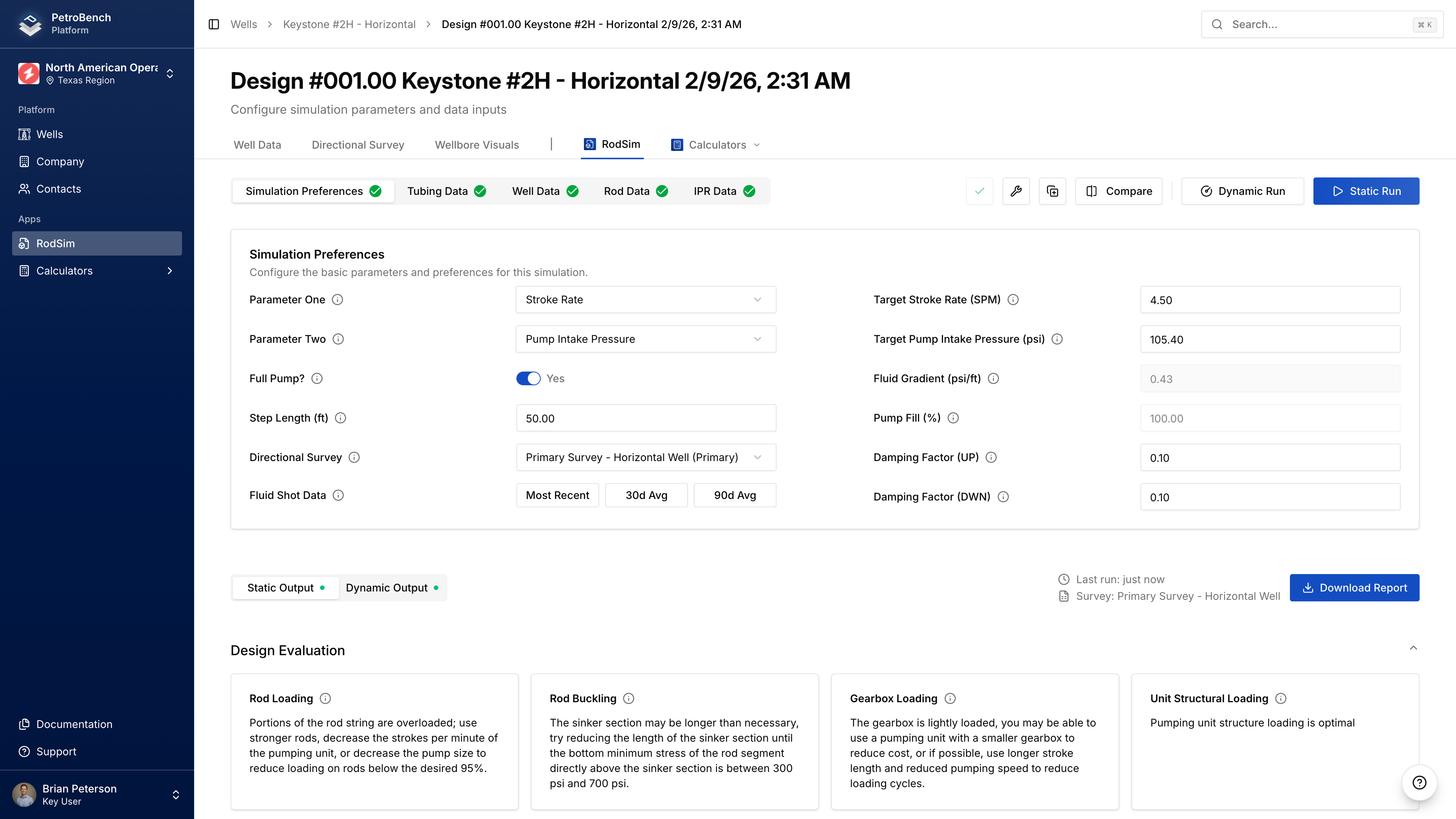
The simulation Inputs page has four tabs: Simulation Preferences, Rod Details, Tubing Data, and IPR Data.
Simulation Preferences
Optimization Parameters
Select what you want to optimize for:
| Parameter | Description |
|---|---|
| Target Production | Desired production rate (BOPD) |
| Target Pumping Speed | Stroke rate (SPM) |
| Target Fluid Level | Producing fluid level depth (ft) |
| Target Pump Intake Pressure | Bottom-hole flowing pressure (PSI) |
Set Parameter One as your primary target and Parameter Two as a secondary constraint.
Click Load from Fluid Shot to populate target fluid level from your well's most recent measurement.
Pumping Unit
- Click Select Pumping Unit
- Filter by manufacturer or search by model number
- Select your unit from the library
If your unit isn't in the library, create a custom unit under Equipment > Pumping Units.
Fluid Properties
| Field | Description |
|---|---|
| Fluid Gradient | PSI per foot (0-0.65) |
| Fluid Above Pump | Distance from pump intake to fluid level (ft) |
Pump Performance
| Field | Description |
|---|---|
| Pump Fill | Percentage of pump barrel filled (0-100%) |
| Pump Condition | Normal, Gas Interference, or Fluid Pound |
| Full Pump Toggle | Forces 100% fill with Gas Interference condition |
Damping & Friction
| Field | Default | Description |
|---|---|---|
| Upstroke Damping | 0.5 | Damping coefficient for upstroke |
| Downstroke Damping | 0.5 | Damping coefficient for downstroke |
| Vertical Friction (Up/Down) | Auto | Rod-tubing friction (lbs) |
Advanced Settings
| Field | Description |
|---|---|
| Use IPR Data | Enable to use well's IPR curve in calculations |
| Step Length | Calculation precision (smaller = more accurate, slower) |
| Directional Survey | Select which survey to use for geometry |
Rod Details
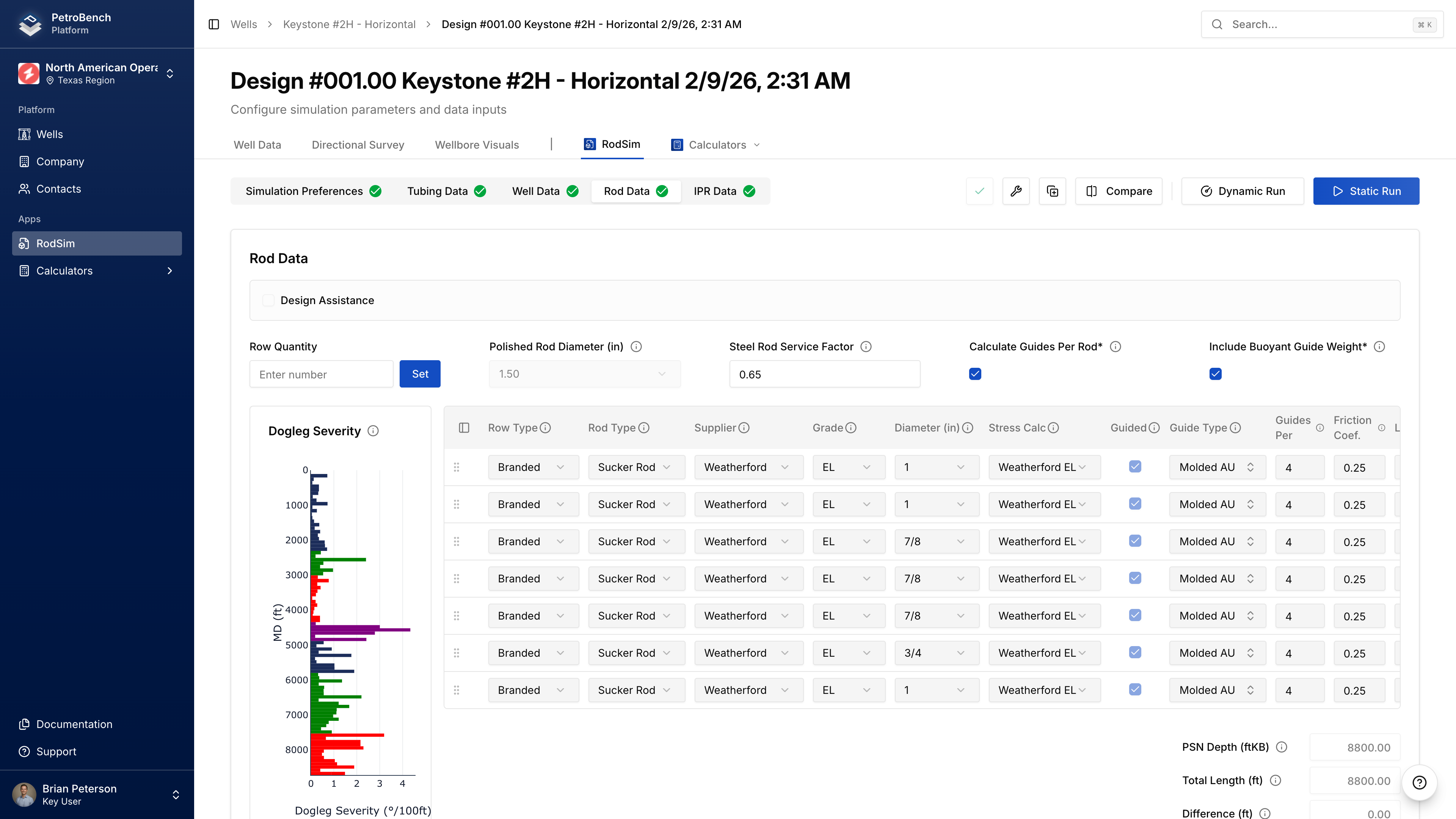
Adding Rod Tapers
Click Add Rod to add a section to your rod string. For each taper:
| Field | Description |
|---|---|
| Rod Type | Sucker Rod, Sinker Bar, or Continuous |
| Manufacturer | Rod manufacturer |
| Grade | Material grade (C, D, K, KD, HS, etc.) |
| Diameter | Nominal size (5/8" to 1-1/8") |
| Length | Length of this section (ft) |
Select Rod Type first - this filters available manufacturers, grades, and diameters.
Rod String Length Validation
Total rod length must be within ±50 feet of PSN depth. If outside this tolerance, you'll get a validation error.
Polished Rod
Select polished rod diameter: 1.00", 1.25", 1.50", 1.75", or 2.00"
Rod Guides
For deviated wells, enable guides on rod sections:
| Field | Description |
|---|---|
| Guided | Enable guides for this taper |
| Guide Type | Molded, snap-on, etc. |
| Guides per Rod | Number per 25 ft rod |
| Friction Coefficient | Guide-tubing friction (default 0.20) |
Custom Rods
If your rod spec isn't in the library:
- Navigate to Equipment > Rods > Custom Rods
- Click Create Custom Rod
- Enter mechanical properties
- Save to organization library
Tubing Data
Pump Setting Depth (PSN)
| Field | Description |
|---|---|
| PSN Depth (MD) | Measured depth to pump (ft) |
| PSN Depth (TVD) | True vertical depth (auto-calculated from survey) |
| PSN Inclination | Wellbore angle at pump (degrees) |
| PSN Dog Leg Severity | Curvature at pump (°/100 ft) |
If you have a directional survey, PSN geometry is calculated automatically.
Tubing Configuration
For each tubing section:
| Field | Description |
|---|---|
| Nominal Size | API size (2-3/8", 2-7/8", 3-1/2", etc.) |
| OD / ID | Outer and inner diameter (inches) |
| Weight | Pounds per foot |
| Grade | Material grade (J-55, N-80, L-80, P-110) |
| Top / Bottom Depth | Measured depths (ft) |
Select nominal size first to filter compatible grades, threads, and weights.
Tubing Anchor
| Field | Description |
|---|---|
| Tubing Anchored | Enable if tubing is anchored |
| Anchor Depth | Depth of anchor (ft MD) |
IPR Data
IPR data improves production predictions by modeling well deliverability.
Reservoir Pressures
| Field | Description |
|---|---|
| Static BHP (SBHP) | Reservoir pressure at mid-perf when shut in (PSI) |
| Bubble Point Pressure | Pressure where gas evolves from solution (PSI) |
| Mid-Perforation Depth | MD to middle of perforated interval (ft) |
Production Test Data
Enter stabilized flow test data:
| Field | Description |
|---|---|
| Test Pressure | Flowing BHP during test (PSI) |
| Test Oil | Oil rate (BOPD) |
| Test Water | Water rate (BWPD) |
| Test Gas | Gas rate (MSCFD) |
Two or more test points at different rates significantly improves IPR curve accuracy.
Deliverability
PetroBench can auto-calculate deliverability parameters from test data, or you can enter them manually:
| Field | Description |
|---|---|
| Deliverability Coefficient (C) | Derived from test data |
| Deliverability Exponent (n) | Typically 0.5-1.0 (0.8 for most oil wells) |
Using IPR in Simulations
- Enter IPR data on this tab
- Go to Simulation Preferences
- Enable Use IPR Data toggle
- Run simulation
Well Data
Additional pump and fluid parameters in the Simulation Preferences section:
Pump Specifications
| Field | Description |
|---|---|
| API Pump Type | Pump designation (RWBC, TRHP, etc.) |
| Pump Diameter | Plunger diameter (inches) |
| Pump Efficiency | Volumetric efficiency (0-100%) |
| Stuffing Box Friction | Friction at wellhead (lbs) |
Fluid Composition
| Field | Description |
|---|---|
| Water Cut | Percentage of water (0-100%) |
| Oil API Gravity | Oil density (API) |
| Water Specific Gravity | Water density relative to fresh water |
| Gas Specific Gravity | Gas density relative to air |
Pressures
| Field | Description |
|---|---|
| Casing Pressure | Annular pressure at surface (PSI) |
| Tubing Pressure | Flowline pressure (PSI, can be negative for vacuum) |
Validation
Before running, PetroBench validates:
- All required fields populated
- Values within valid ranges
- Rod string length within ±50 ft of PSN depth
- Pumping speed below maximum for unit
Missing or invalid fields will show error messages indicating which section needs correction.
Next Steps
- Run the simulation after configuration is complete
- Compare simulations to evaluate design alternatives
Creating a Simulation
Create a new RodSim rod pump simulation in PetroBench. Select a well, choose equipment, and configure operating parameters to start your analysis.
Running Simulations
Run RodSim simulations and analyze results in PetroBench. View dynamometer cards, stress diagrams, production forecasts, and export PDF reports.